There I’ll present example usage of ComfyUI with TTS.
ComfyUI natively doesn’t have TTS node, but there is TTS Audio Suite package that contains many nodes integrating various TTS engines to try on.
After tests, Higgs Audio v3 Engine turned out to be the best solution for generating polish speech and that’s why I’ll be using it further.
Installation
I myself went with installing manually TTS-Audio-Suite so if ComfyUI Manager doesn’t work, these are the steps:
## First we go to ComfyUI's custom_nodes foldercd /path/to/comfy-ui/custom_nodes## Clone the repogit clone https://github.com/diodiogod/TTS-Audio-Suite## Back to the rootcd ..## Install the depsuv pip install -r custom_nodes/tts_audio_suite/requirements.txt## Run the server and you should see the TTS engines loading progressuv run main.py
Building the workflow
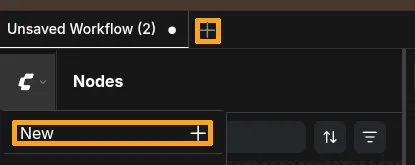
First of all, you need to click + on the top or New after clicking the logo of ComfyUI to create new workflow.
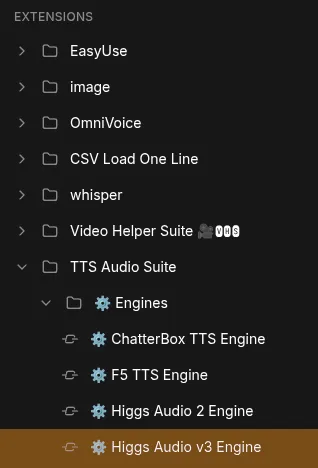
Then click Nodes, scroll to Extensions sections and there you should find TTS Audio Suite
From Engines drag Higgs Audio v3 Engine into workspace
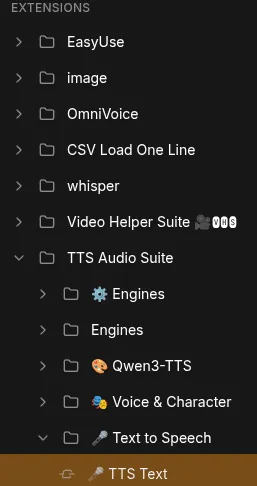
From Text to Speech drag TTS Text
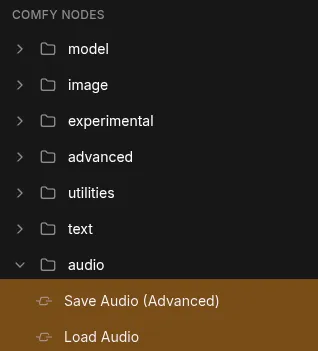
Next scroll into Comfy nodes section, click audio then drag Save Audio and Load Audio into workspace
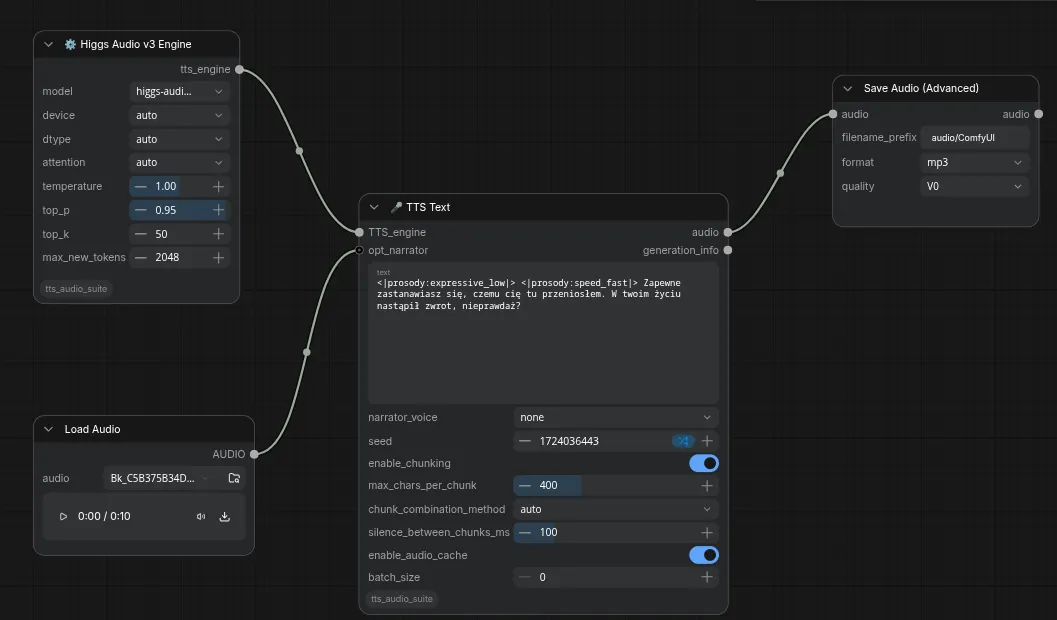
Load Audio should be connected to opt_narrator, Higgs Audio v3 Engine -
TTS_engine in node TTS Text
Load Audio - determines the audio sample that should be cloned
Higgs Audio v3 Engine - determines the TTS engine that should be used. Maybe be exchanged for another for experiments.
Field audio in TTS Text should be connected with audio in node Save Audio, that will save the audio into output in ComfyUI folder
It should look like this
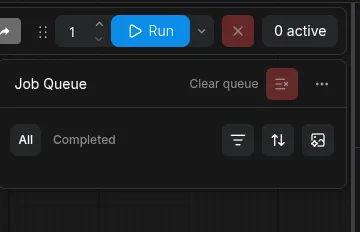
After assembling the workflow, click Run and workflow will being working.
At first it’ll download model from Huggingface, then it’ll start generating audio.
Prompting HiggsTTS 3
HiggsTTS 3 in theory allows manipulating style and emotions of voice.
To do that, you need to put special tokens between <|…|> before text, that should have given trait.
To achieve desired effect, it’s worth trying generating over and over with different seeds since HiggsTTS will output slightly different results for same text + audio pair.
It’s also possible to force english voice to sound like polish, but the results may vary from having english accent to have proper polish or accents being mixed.
<|emotion:determination|> Najwyższy czas oczyścić ten dom z tego tałatajstwa! <|emotion:contentment|> Na mój znak?!
There question mark was used to hack the desired tone.
Do ataku, teraz! <|style:shouting|> <|emotion:anger|> Zniszcz to; szybko!
<|emotion:relief|> W ostatniej chwili! … <|sfx:sigh|> … <|emotion:relief|> Jesteśmy tutaj bezpieczni.
Introduction
This guide demonstrates how to use ComfyUI with Text-to-Speech (TTS) technology.
While ComfyUI does not include TTS functionality by default, you can add it using the TTS Audio Suite package. This package includes various nodes that integrate different TTS engines.
For this tutorial, we will use the Higgs Audio v3 Engine, as it provides excellent results for generating Polish speech.
Installation
If you cannot install the package via the ComfyUI Manager, you can install it manually by following these steps:
## 1. Navigate to your ComfyUI custom_nodes foldercd /path/to/comfy-ui/custom_nodes## 2. Clone the repositorygit clone https://github.com/diodiogod/TTS-Audio-Suite## 3. Return to the ComfyUI root directorycd ..## 4. Install the required dependenciesuv pip install -r custom_nodes/tts_audio_suite/requirements.txt## 5. Run the serveruv run main.py
Note: When you run the server, you should see a progress indicator as the TTS engines load.
Building the Workflow
To set up the TTS workflow, follow these steps:
Create a new workflow: Click the + icon at the top or click the ComfyUI logo and select New.
Add the TTS nodes: Right-click or use the Nodes menu, scroll to the Extensions section, and locate TTS Audio Suite.
Drag the Higgs Audio v3 Engine from the Engines category into your workspace.
Drag the TTS Text node from the Text to Speech category into your workspace.
Add audio nodes: In the Comfy nodes section, navigate to audio and drag both Save Audio and Load Audio nodes into your workspace.
Connect the nodes:
Voice Cloning: Connect the Load Audio node to the opt_narrator input on the TTS Text node. This node provides the audio sample used to clone a specific voice.
Choosing the Engine: Connect the Higgs Audio v3 Engine node to the TTS_engine input on the TTS Text node. You can experiment by swapping this for other available engines.
Save the output: Connect the audio output from the TTS Text node to the audio input of the Save Audio node. This ensures the generated speech is saved into the output folder within your ComfyUI directory.
The completed workflow should look like this
Once your nodes are connected, click Run. The system will first download the necessary models from Huggingface and then begin generating the audio.
Prompting HiggsTTS 3
HiggsTTS 3 allows you to manipulate the style and emotion of the voice. To do this, you insert “tokens” (special tags) before your text.
Variety: Since HiggsTTS may produce slightly different results even with the same text and audio, try generating the audio multiple times using different “seeds” to find the perfect take.
Accents: While you can attempt to force an English voice to sound Polish, the results vary and may result in a mix of English and Polish accents.
Reference
Emotions
Token
Description
<|emotion:elation|>
Elation / joy
<|emotion:amusement|>
Amusement / playful laughter
<|emotion:enthusiasm|>
Enthusiasm / excitement
<|emotion:determination|>
Determination / firmness
<|emotion:pride|>
Pride / confidence
<|emotion:contentment|>
Calm satisfaction
<|emotion:affection|>
Warmth / affection
<|emotion:relief|>
Relief
<|emotion:contemplation|>
Thoughtful / reflective
<|emotion:confusion|>
Confused
<|emotion:surprise|>
Surprised
<|emotion:awe|>
Awe / wonder
<|emotion:longing|>
Longing / yearning
<|emotion:arousal|>
Heightened desire
<|emotion:anger|>
Anger
<|emotion:fear|>
Fear
<|emotion:disgust|>
Disgust
<|emotion:bitterness|>
Bitterness
<|emotion:sadness|>
Sadness
<|emotion:shame|>
Shame
<|emotion:helplessness|>
Helplessness
Style
Token
Description
<|style:singing|>
Singing
<|style:shouting|>
Shouting / projected voice
<|style:whispering|>
Whisper
Sound Effects
Token
Description
Suggested onomatopoeia
<|sfx:cough|>
Cough
Ahem
<|sfx:laughter|>
Laughter
Haha / Hehe
<|sfx:crying|>
Crying
Boohoo / Sob
<|sfx:screaming|>
Screaming
Ahh / Aaah
<|sfx:burping|>
Burping
Burp
<|sfx:humming|>
Humming
Hmm / Mmm
<|sfx:sigh|>
Sigh
Uh / Ahh
<|sfx:sniff|>
Sniff
Sff
<|sfx:sneeze|>
Sneeze
Achoo
Prosody
Token
Effect
<|prosody:speed_very_slow|>
≈0.65× speed
<|prosody:speed_slow|>
≈0.85× speed
<|prosody:speed_fast|>
≈1.2× speed
<|prosody:speed_very_fast|>
≈1.4× speed
<|prosody:pitch_low|>
≈−3 semitones
<|prosody:pitch_high|>
≈+2.5 semitones
<|prosody:pause|>
≈400–700 ms pause
<|prosody:long_pause|>
≈700–1500 ms pause
<|prosody:expressive_high|>
More expressive delivery
<|prosody:expressive_low|>
Flatter delivery
Examples (Polish Language)
The following examples use text inspired by The Elder Scrolls V: Skyrim, specifically from the Polish dubbing of the House of Horrors - Quest Expansion mod.
<|emotion:determination|> Najwyższy czas oczyścić ten dom z tego tałatajstwa! <|emotion:contentment|> Na mój znak?!
Note: The question mark was used to influence the desired tone.
Do ataku, teraz! <|style:shouting|> <|emotion:anger|> Zniszcz to; szybko!
<|emotion:relief|> W ostatniej chwili! … <|sfx:sigh|> … <|emotion:relief|> Jesteśmy tutaj bezpieczni.
Introduction
In this article you’ll learn how to use ComfyUI together with a text‑to‑speech (TTS) system called HiggsTTS 3.
ComfyUI itself does not include a TTS node, but the TTS Audio Suite adds many nodes that connect different TTS engines. After testing several options, the Higgs Audio v3 Engine proved to be the best for generating Polish‑style speech, so we’ll focus on it.
Installation
If the ComfyUI Manager does not work, install the TTS package manually:
# Go to the custom_nodes folder of your ComfyUI installationcd /path/to/comfy-ui/custom_nodes# Clone the TTS Audio Suite repositorygit clone https://github.com/diodiogod/TTS-Audio-Suite# Return to the root directorycd ..# Install required Python packagesuv pip install -r custom_nodes/tts_audio_suite/requirements.txt# Start ComfyUI so the new nodes appearuv run main.py
You should see a progress bar while the TTS engines load.
Building the workflow
Create a new workflow
Click the + button on the top left of the interface or select New after clicking the ComfyUI logo.
Add TTS nodes
• Open the Nodes panel and scroll to the Extensions section.
• Drag Higgs Audio v3 Engine from the Engines list into your workspace.
• Drag TTS Text from the Text to Speech list.
Add audio nodes
• In the Comfy nodes section, find Audio.
• Drag Save Audio and Load Audio into your workspace.
Connect the nodes
Load Audio → opt_narrator (the audio sample to clone) and TTS_engine in the TTS Text node.
Save Audio → audio input of the TTS Text node, which will store the generated audio in the ComfyUI output folder.
It should look like this
Run the workflow
Click Run. The first time it will download the model from Huggingface, then start generating audio.
Prompting HiggsTTS 3
HiggsTTS 3 lets you change the voice’s style and emotions by inserting special tokens in your text. These tokens appear between |< and >|.
For example: <|emotion:joy|>Hello world!
Because HiggsTTS can produce slightly different results for the same text and seed, try generating multiple times with different seeds to get the best sounding output.
You can also force an English voice to sound Polish; however, the quality may vary.
Reference
Emotions
Token
Description
<|emotion:elation|>
Joy
<|emotion:amusement|>
Playful laughter
<|emotion:enthusiasm|>
Excitement
<|emotion:determination|>
Firmness
<|emotion:pride|>
Confidence
<|emotion:contentment|>
Calm satisfaction
<|emotion:affection|>
Warmth
<|emotion:relief|>
Relief
<|emotion:contemplation|>
Reflective
<|emotion:confusion|>
Confused
<|emotion:surprise|>
Surprised
<|emotion:awe|>
Wonder
<|emotion:longing|>
Yawning
<|emotion:arousal|>
Heightened desire
<|emotion:anger|>
Anger
<|emotion:fear|>
Fear
<|emotion:disgust|>
Disgust
<|emotion:bitterness|>
Bitterness
<|emotion:sadness|>
Sadness
<|emotion:shame|>
Shame
<|emotion:helplessness|>
Helplessness
Style
Token
Description
<|style:singing|>
Singing
<|style:shouting|>
Shouted voice
<|style:whispering|>
Whispered voice
Sound Effects
Token
Description
Suggested onomatopoeia
<|sfx:cough|>
Cough
Ahem
<|sfx:laughter|>
Laughter
Haha / Hehe
<|sfx:crying|>
Crying
Boohoo / Sob
<|sfx:screaming|>
Screaming
Ahh / Aaah
<|sfx:burping|>
Burping
Burp
<|sfx:humming|>
Humming
Hmm / Mmm
<|sfx:sigh|>
Sigh
Uh / Ahh
<|sfx:sniff|>
Sniff
Sff
<|sfx:sneeze|>
Sneeze
Achoo
Prosody
Token
Effect
<|prosody:speed_very_slow|>
≈0.65× speed
<|prosody:speed_slow|>
≈0.85× speed
<|prosody:speed_fast|>
≈1.2× speed
<|prosody:speed_very_fast|>
≈1.4× speed
<|prosody:pitch_low|>
≈−3 semitones
<|prosody:pitch_high|>
≈+2.5 semitones
<|prosody:pause|>
≈400–700 ms pause
<|prosody:long_pause|>
≈700–1500 ms pause
<|prosody:expressive_high|>
More expressive delivery
<|prosody:expressive_low|>
Flatter delivery
Examples (Polish)
The following texts were generated from samples of TES V: Skyrim while working on the Polish dubbing for the mod House of Horrors – Quest Expansion.
<|emotion:determination|> Najwyższy czas oczyścić ten dom z tego tałatajstwa! <|emotion:contentment|> Na mój znak?!
The question mark was used to tweak the tone.
Do ataku, teraz! <|style:shouting|> <|emotion:anger|> Zniszcz to; szybko!
<|emotion:relief|> W ostatniej chwili! … <|sfx:sigh|> … <|emotion:relief|> Jesteśmy tutaj bezpieczni.
Introduction
In this guide, we will walk through an example of using ComfyUI with Text-to-Speech (TTS).
ComfyUI does not have a TTS node built-in, but the TTS Audio Suite package contains many nodes that integrate various TTS engines for you to try.
After testing different engines, the Higgs Audio v3 Engine was found to be the best solution for generating Polish speech, so we will use it for the rest of this guide.
Installation
If the ComfyUI Manager does not work for you, you can install the package manually. Here are the steps:
## First, navigate to ComfyUI's custom_nodes foldercd /path/to/comfy-ui/custom_nodes## Clone the repositorygit clone https://github.com/diodiogod/TTS-Audio-Suite## Go back to the root directorycd ..## Install the dependenciesuv pip install -r custom_nodes/tts_audio_suite/requirements.txt## Run the server; you should see the TTS engines loading progressuv run main.py
Building the Workflow
Create a new workflow. Click the + button at the top or select New after clicking the ComfyUI logo.
Add the TTS nodes. Scroll to the Extensions section and find TTS Audio Suite.
Drag Higgs Audio v3 Engine into the workspace.
Drag TTS Text into the workspace.
Add audio nodes. Scroll to the Comfy nodes section, click audio, and drag Save Audio and Load Audio into the workspace.
Connect the nodes.
Connect Load Audio to the opt_narrator input.
Connect Higgs Audio v3 Engine to the TTS_engine input in the TTS Text node.
Load Audio determines the audio sample that should be cloned.
Higgs Audio v3 Engine determines which TTS engine should be used. You can swap this out for other engines to experiment.
Connect the output. Connect the audio field in TTS Text to the audio field in the Save Audio node. This will save the generated audio to the output folder in ComfyUI.
It should look like this
Once the workflow is assembled, click Run to start processing.
At first, it will download the model from Huggingface, and then it will begin generating the audio.
Prompting HiggsTTS 3
HiggsTTS 3 allows you to manipulate the style and emotions of the voice.
To do this, you need to insert special tokens between <|...|> tags before the text you want to affect.
To achieve the desired effect, it is worth trying to generate the audio multiple times with different seeds, as HiggsTTS will output slightly different results for the same text and audio pair.
It is also possible to force an English voice to sound Polish, though the results may vary from having an English accent to having proper Polish, or a mix of both.
Reference
Emotions
Token
Description
<|emotion:elation|>
Elation / joy
<|emotion:amusement|>
Amusement / playful laughter
<|emotion:enthusiasm|>
Enthusiasm / excitement
<|emotion:determination|>
Determination / firmness
<|emotion:pride|>
Pride / confidence
<|emotion:contentment|>
Calm satisfaction
<|emotion:affection|>
Warmth / affection
<|emotion:relief|>
Relief
<|emotion:contemplation|>
Thoughtful / reflective
<|emotion:confusion|>
Confused
<|emotion:surprise|>
Surprised
<|emotion:awe|>
Awe / wonder
<|emotion:longing|>
Longing / yearning
<|emotion:arousal|>
Heightened desire
<|emotion:anger|>
Anger
<|emotion:fear|>
Fear
<|emotion:disgust|>
Disgust
<|emotion:bitterness|>
Bitterness
<|emotion:sadness|>
Sadness
<|emotion:shame|>
Shame
<|emotion:helplessness|>
Helplessness
Style
Token
Description
<|style:singing|>
Singing
<|style:shouting|>
Shouting / projected voice
<|style:whispering|>
Whisper
Sound Effects
Token
Description
Suggested onomatopoeia
<|sfx:cough|>
Cough
Ahem
<|sfx:laughter|>
Laughter
Haha / Hehe
<|sfx:crying|>
Crying
Boohoo / Sob
<|sfx:screaming|>
Screaming
Ahh / Aaah
<|sfx:burping|>
Burping
Burp
<|sfx:humming|>
Humming
Hmm / Mmm
<|sfx:sigh|>
Sigh
Uh / Ahh
<|sfx:sniff|>
Sniff
Sff
<|sfx:sneeze|>
Sneeze
Achoo
Prosody
Token
Effect
<|prosody:speed_very_slow|>
≈0.65× speed
<|prosody:speed_slow|>
≈0.85× speed
<|prosody:speed_fast|>
≈1.2× speed
<|prosody:speed_very_fast|>
≈1.4× speed
<|prosody:pitch_low|>
≈−3 semitones
<|prosody:pitch_high|>
≈+2.5 semitones
<|prosody:pause|>
≈400–700 ms pause
<|prosody:long_pause|>
≈700–1500 ms pause
<|prosody:expressive_high|>
More expressive delivery
<|prosody:expressive_low|>
Flatter delivery
Examples (PL lang):
Texts were generated based on samples from TES V: Skyrim while working on the Polish dubbing of the mod House of Horrors - Quest Expansion.
<|emotion:determination|> Najwyższy czas oczyścić ten dom z tego tałatajstwa! <|emotion:contentment|> Na mój znak?!
There question mark was used to hack the desired tone.
Do ataku, teraz! <|style:shouting|> <|emotion:anger|> Zniszcz to; szybko!
<|emotion:relief|> W ostatniej chwili! … <|sfx:sigh|> … <|emotion:relief|> Jesteśmy tutaj bezpieczni.
 It should look like this